
 Documentation
Editor guide
Character Output Profile
Map animation values to character properties, materials or blendshapes.
Concept
A character output writes an animation value to a configured actor component target.
In BAS
A profile names parts and bindings. The actor assigns actual components to those parts. Bindings can target blendshape weights, supported component properties or material properties.
Each binding chooses a source, value conversion and fallback. Property targets can need prepared accessors.
Example
Use an animation channel to change a blendshape weight on the actor assigned to the profile part.
Definition source
Runtime/Outputs/CharacterOutputProfile.cs
Editor
Editor view
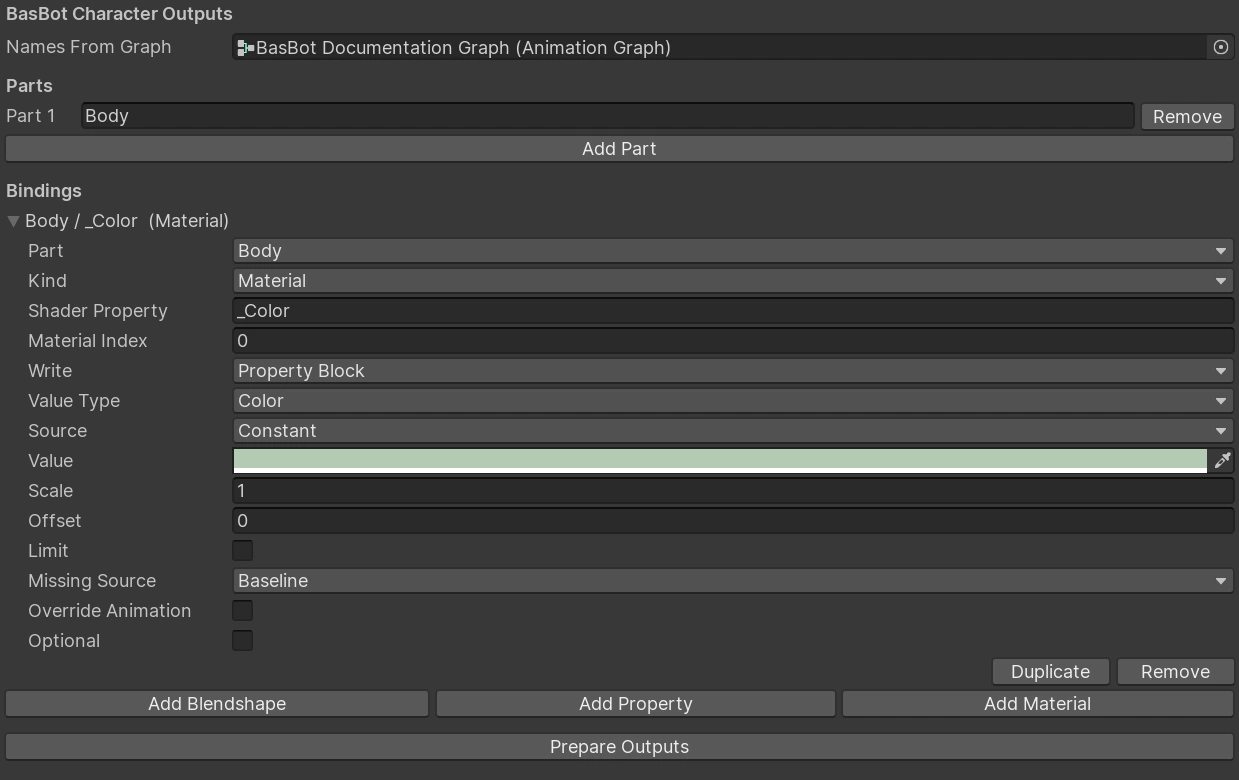
Open the tool
Select a Character Output Profile asset.
Inspector
Parts name the actor components that receive output. Each binding selects a source value, converts it, and writes a member on that part.
Names From Graph supplies picker names for this Editor session. Each actor resolves the profile against its own graph and assigned components.
| Control or section | Function |
|---|---|
| Parts | Name the target groups. The actor assigns the actual components. |
| Source | Use a channel, compatible variable or constant. |
| Target kind | Choose BlendShape, Property or Material. |
| Conversion | Set scale, offset, optional limits and rounding where the value type requires it. |
| Fallback | Use the captured baseline, a saved fallback value or the last applied value when no source owns the target. |
| Material mode | Use a Property Block or an owned material copy. |
| Prepare Outputs | Validate property members and generate required accessors. |
Basic procedure
- Add a named part and assign its actor components.
- Add a binding and choose its source and target member.
- Set conversion and fallback behavior.
- Prepare Outputs when the profile needs generated property accessors.
Saved data
- The profile stores part and binding definitions. Actor component assignments belong to the actor.
- Names From Graph is a session choice.
Requirements and limits
- A target member must support the selected value type.
- Material output modes preserve shared material assets; an owned material has its own lifetime.
Reference details
These instructions describe BAS 1.0 in Unity 6000.3.7f1.
Related Editor types: CharacterOutputProfileEditor.