
 Documentation
Editor guide
Generate AnimInstance
Create an initial runtime class for character animation code.
Editor view
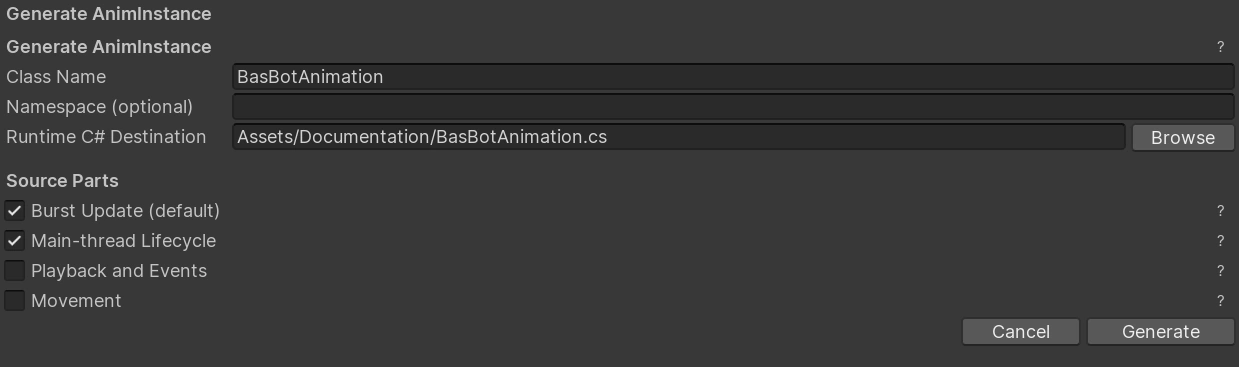
Open the tool
Open Class Defaults in the Graph Editor and select Generate AnimInstance.
Class and source parts
Set a public class name, optional namespace and runtime C# destination. Choose only the source parts that the class needs.
The previous graph type remains selected until source generation, compilation and reload complete.
| Control or section | Function |
|---|---|
| Burst Update | Create an unmanaged update struct and its association. |
| Main-thread Lifecycle | Create lifecycle methods for gameplay inputs. |
| Playback and Events | Create animation event and playback callbacks. |
| Movement | Create OnAnimatorMove. Keep one owner for root motion. |
| Generate | Write the new class to a valid runtime folder under Assets. |
Basic procedure
- Choose a valid class name and runtime destination.
- Select the required source parts.
- Generate the class.
- Wait for compilation and reload, then check the graph type selection.
Saved data
- The tool creates a runtime C# source file.
- Graph variable and slot declarations remain in the graph generated accessor.
Requirements and limits
- The class name, namespace and destination must be valid.
- Do not place the generated runtime class in an Editor-only folder.
Reference details
These instructions describe BAS 1.0 in Unity 6000.3.7f1.
Related Editor types: AnimInstanceGenerationWindow.