
 Documentation
Node reference / Skeletal controls
FABRIK
Rotate a chain of 2 to 32 bones toward a target with a repeated position solve.
Concept
FABRIK is a chain inverse-kinematics method that moves joint positions toward an end target.
In BAS
In BAS, select a valid root-to-tip bone chain. Precision and iteration limits control when the solve stops.
The control also provides choices for the tip rotation. A successful position solve does not by itself specify every desired bone orientation.
Example
Use FABRIK to move the end of a multi-bone chain toward a target, then inspect the tip rotation settings.
Definition source
Editor/GraphHelp.Controls.cs
Node
How it works
The solver makes backward and forward passes over the chain. It stops when the tip is within the tolerance or Max Iterations is reached.
The root position stays fixed and segment lengths stay unchanged. The solved positions determine bone rotations.
Tolerance is a fraction of the current chain length. A value of 0.001 on a 1-metre chain gives a stopping distance of 0.001 metre.
Inputs and output
| Port | Type | Function |
|---|---|---|
| Source | Ordinary pose | The input pose to change. |
| Weight | Float | Blend the control result with the source. The default is 1. |
| Target Position | Vector3 | Default uses the incoming tip position. |
| Target Rotation | Quaternion | Used with Copy From Target. |
| Pose | Output | The source with the weighted chain solve. |
Settings
| Setting | Default | Function |
|---|---|---|
| Chain | Empty | Bind 2 to 32 bones in parent-to-child order, from root to tip. |
| Input space | Component | Select the frame for each active target input. |
| Tip Rotation | Keep Local | Keep the local rotation, retain incoming component rotation, or copy Target Rotation. |
| Max Iterations | 32 | Maximum solver passes. Valid range: 1 to 128. |
| Tolerance | 0.001 | Relative stopping distance. Valid range: 0.000001 to 0.1. |
| Weight | 1 | Control influence, clamped to 0 to 1. |
| LOD Threshold | Disabled | Above the selected level, pass the source through and keep control state. |
Common node controls
Name changes the canvas label. Type identifies the node and is read-only. Advanced shows structural pose connections and retained data.
Scalar input rows can use a stored constant or a compatible connected source. Use Show as Pin where available to show an optional input on the card. The selected source supplies the value.
Preview model selects the model used to resolve bone choices in the picker. Bone references can identify Humanoid roles or transform paths. The picker does not replace the graph character model.
Control input sources
| Setting | Function |
|---|---|
| Default | Use the incoming-pose value described for the input. Offsets use zero or identity defaults. |
| Constant | Use the typed value stored on the node. Rotation fields show Yaw, Pitch and Roll in degrees and store a quaternion. |
| Variable | Read a compatible input binding. |
| Inactive inputs | Changing a mode retains inactive settings. Only the active inputs affect the control. |
Input spaces
| Setting | Function |
|---|---|
| Parent Bone | Use the parent frame of the input space bone. |
| Bone | Use the frame of the input space bone itself. |
| Component | Use the prepared skeleton model frame. |
| World | Use the scene frame, including the current character transform and scale. |
| Space Bone | Select another frame bone for Bone or Parent Bone space. If none is selected, use the input default frame bone. |
| World-stage evaluation | A built-in control with an active World input runs after root motion and motor movement. The Editor reports this requirement. |
Level of detail
| Setting | Function |
|---|---|
| Disabled | Apply no node threshold. |
| Enabled | Run the node when the character LOD level is at or below the selected level. Level 0 is a valid enabled threshold. |
| Above the threshold | Use the pass-through behavior stated for this node. LOD changes do not replace the node input requirements. |
Setup example
- Connect Source and bind the ordered chain.
- Set a target source and its frame.
- Start with the default iteration and tolerance values. Adjust them only if the result requires it.
Try it in Gallery
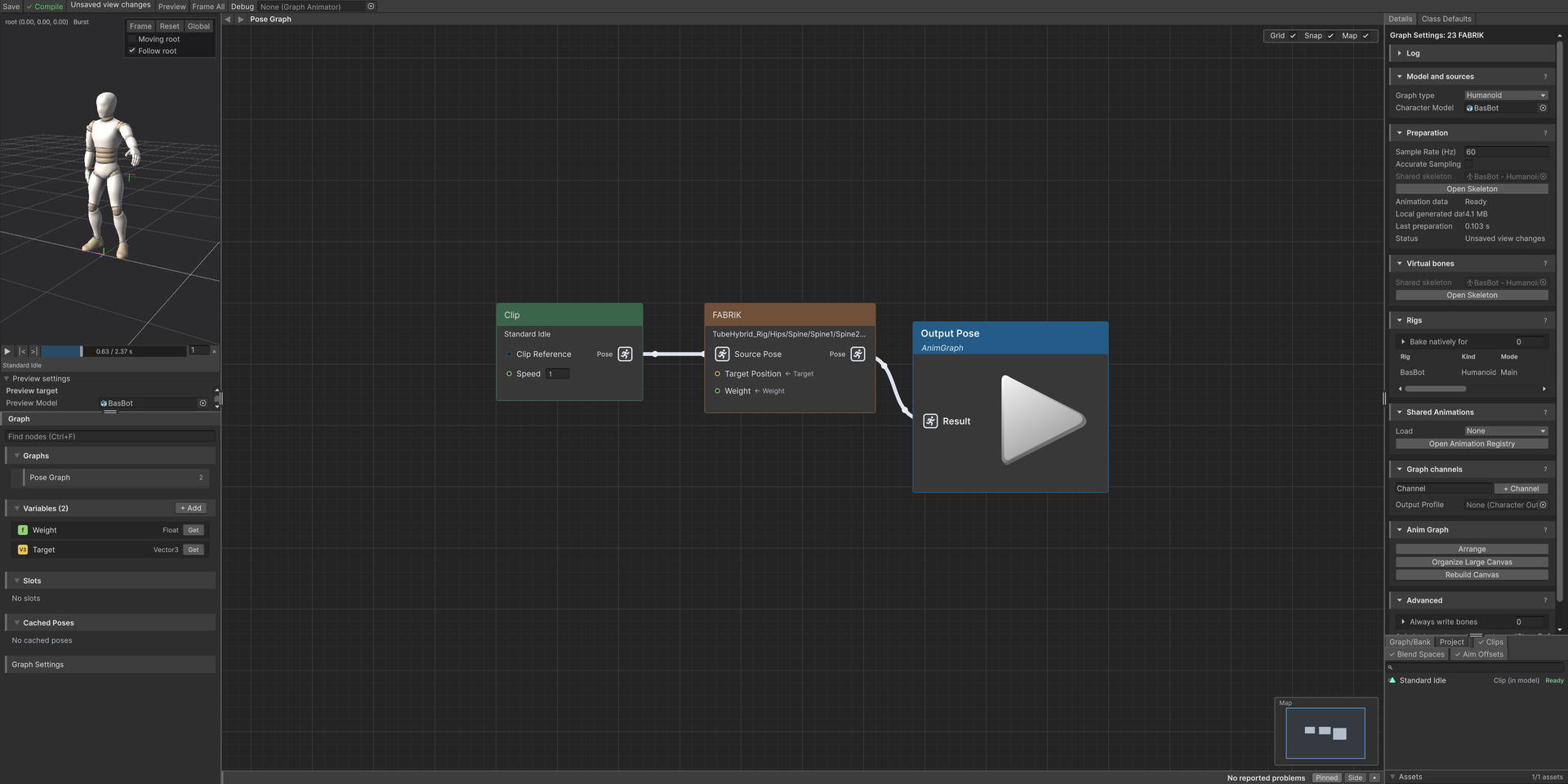
Open 23 FABRIK in the Gallery Graphs folder. Inspect the bone chain and change Target or Weight to compare the poses.
Requirements and limits
- Bones and ancestors require positive uniform scale. Chain segments must have nonzero length.
- The solver does not stretch the chain to reach a distant target.
- An empty binding passes the source through with an Editor warning. Partial or invalid bindings remain errors.
Editor guides
Reference details
BAS 1.0 reference. Node type: FabrikNode. Main source: BuiltinSkeletalControls.cs. Defaults also use the node constructor and the shared Editor field definitions.