
 Documentation
Editor guide
Clip Settings
Set BAS source mapping, sample quality and additive preparation for one clip.
Editor view
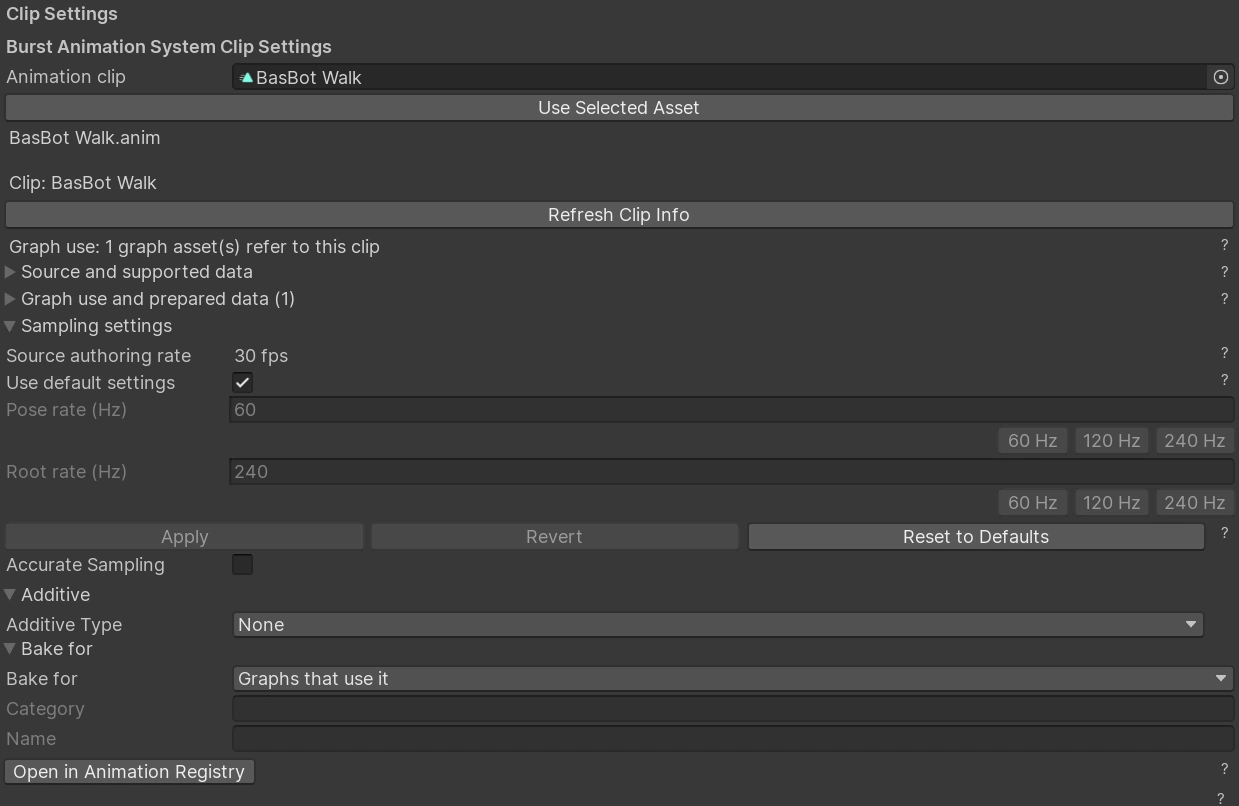
Open the tool
Select a clip and use Tools > Burst Animation System > Editors > Clip Settings, or open it from the clip Inspector.
Source and sampling
Select the clip at the top of the window. A model file with several clips also provides a Clip in model file choice.
Source mapping identifies the source model needed for a Humanoid clip. The visible target rig is a separate preview choice.
Sampling settings control stored pose and root samples. Use default settings keeps the graph-selected quality. These settings do not set the game frame rate.
| Control or section | Function |
|---|---|
| Pose rate / Root rate | Choose the stored sample rates when graph defaults are off. |
| Accurate Sampling | Allow preparation to raise a clip pose rate to meet the source-pose limits. |
| Compression | Choose the supported prepared-data compression settings. |
| Apply | Write pending sampling values to the project clip settings. |
Additive settings
Additive Type selects ordinary, Local or Mesh additive data. The base can be a frame of this clip, a frame of another clip, or the rig reference pose.
Additive changes are saved when a complete valid choice is made. Sampling-rate edits keep their separate Apply step.
| Control or section | Function |
|---|---|
| Base clip / Base time | Define the reference frame when the selected base mode uses one. |
| Prepared data | Changing relevant source or quality settings can require another preparation. |
Settings that travel with clips
Select a folder and use Assets > Burst Animation System > Export Clip Settings Pack. BAS reads the pack when you import it with the clips.
The pack Inspector lists the clips it covers. Changes in your project use the project Clip Settings file and take priority over the pack.
Basic procedure
- Select the intended clip.
- Check its source model and sampling defaults.
- Set Additive Type only when the clip must produce a delta.
- Apply pending sampling changes and save or compile the graph that uses the clip.
Saved data
- BAS stores these settings in its project clip-settings data.
- The source clip and model importer retain their own animation settings.
Requirements and limits
- Do not treat the source frame rate, prepared sample rate and game frame rate as the same setting.
- Generic and Object Hierarchy clips do not support the explicit Humanoid Mirror and Foot IK forms.
Reference details
These instructions describe BAS 1.0 in Unity 6000.3.7f1.
Related Editor types: ClipSamplingSettingsWindow, ClipSettingsPackInspector.