
 Documentation
Editor guide
Preview Bake Cache
Inspect and control the local cache used by Humanoid animation previews.
Concept
The preview bake cache stores reusable sampled Humanoid animation for Editor previews.
In BAS
Saved source clips can use local disk entries after an Editor restart. Unsaved data uses the memory cache only.
Changed sources, models or settings can require another preview bake. This cache is separate from saved graph preparation. Clearing it removes reusable preview samples, not the source animation.
Example
Inspect the local cache size in preferences when managing preview sample storage.
- Clip, model and settingsIdentify the preview inputs
- Preview bakeStore reusable samples locally
- Later previewReuse the matching samples
Definition source
Editor/PreviewBakeCache/PreviewBakeCacheSettings.cs
Editor
Editor view
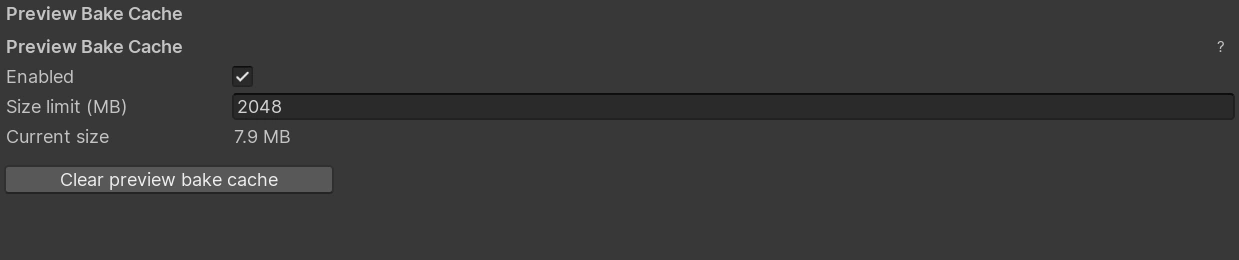
Open the tool
Open Edit > Preferences > Burst Animation System > Preview Bake Cache.
Cache settings
The Clip, Blend Space and Montage previews can reuse matching sampled Humanoid clips. Saved sources can use the local disk cache after an Editor restart.
Changed sources, target models or preparation settings can require another preview bake. Unsaved data uses the memory cache only.
| Control or section | Function |
|---|---|
| Enabled | Keep and reuse sampled preview clips. |
| Size limit (MB) | Set the local disk limit. Older unused entries can be removed when the limit is exceeded. |
| Current size | Read the current local cache size. |
| Clear preview bake cache | Remove reusable preview samples. Later previews can sample them again. |
Move an old preview record
For an older standalone preview record, select it in Project. Its Inspector shows its animation asset, Skeleton, preview model and preview base.
Select Move Settings and Remove This File to move the data into the current storage. BAS retains existing local choices and shared defaults and writes a recovery copy to Library.
Basic procedure
- Open the cache preferences.
- Read the current size and configured limit.
- Change the limit or clear the cache only when required.
Saved data
- Preview bake cache data is local under Library/BAS/PreviewBakes.
- Current preview selections use Library/GeneralRotors/BurstAnimationSystem/PreviewContexts. Shared Skeleton and preview defaults belong to the animation asset.
Requirements and limits
- Clearing this cache makes later previews sample the clips again. Saved graph preparation uses its own data.
Reference details
These instructions describe BAS 1.0 in Unity 6000.3.7f1.
Related Editor types: PreviewBakeCacheSettings, AssetPreviewContextEditor.