
 Documentation
Node reference / Blends
Blend 1D
Blend neighboring pose inputs along one ordered set of thresholds.
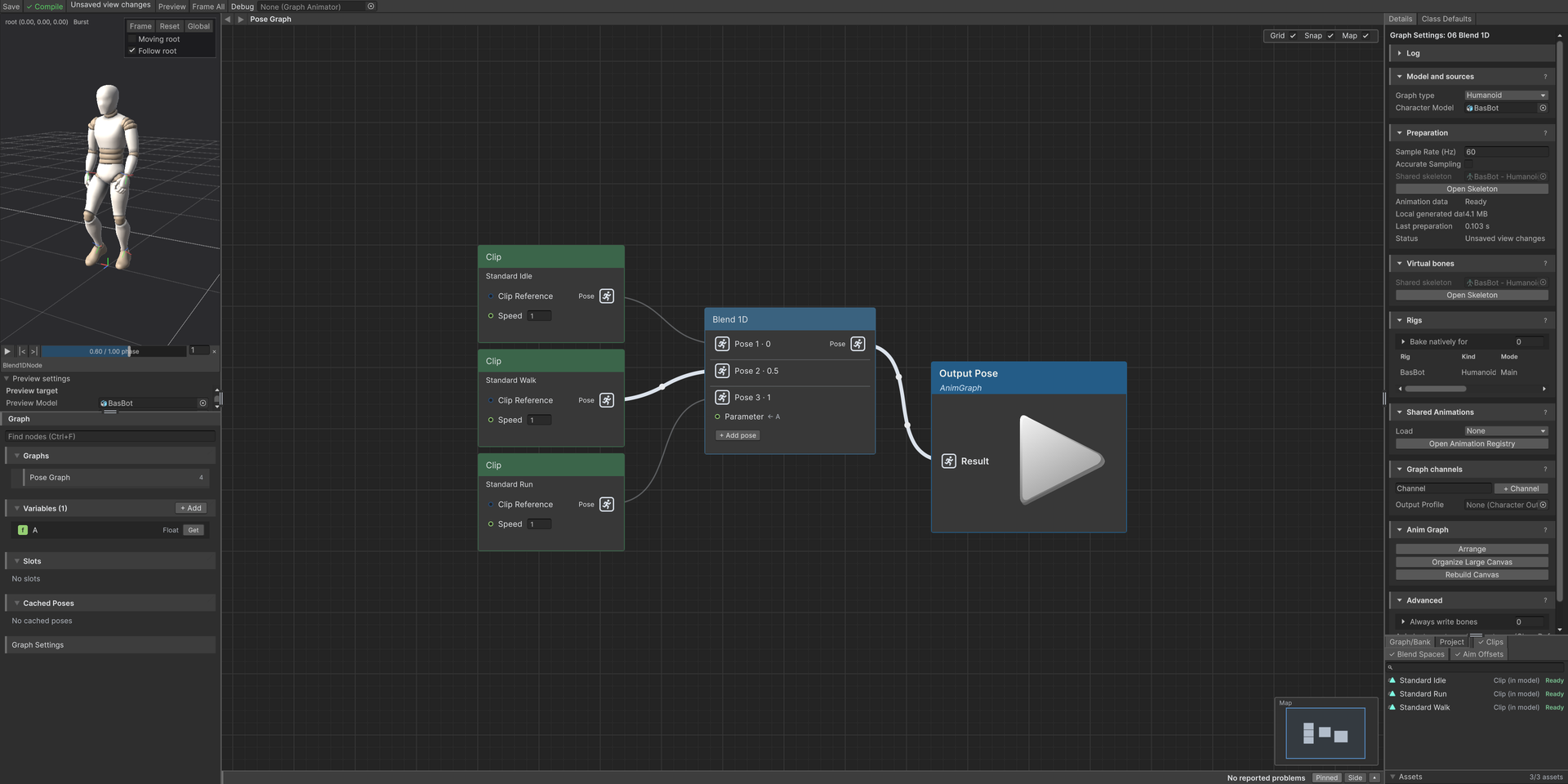
How it works
Parameter selects a position on the threshold axis. Between thresholds, the node blends the two neighboring poses.
Each pose has one threshold. For idle, walk and run, a movement speed input can select between thresholds 0, 2 and 5.
Synchronize Children keeps eligible Clip inputs at the same normalized playback phase.
Inputs and output
| Port | Type | Function |
|---|---|---|
| Samples | Pose list | Pose inputs in threshold order. |
| Parameter | Float | The position on the threshold axis. |
| Pose | Output | The blended result. |
Settings
| Setting | Default | Function |
|---|---|---|
| Samples / Threshold | Empty | Add at least one pose. Give each pose one strictly increasing threshold. |
| Parameter | 0 | Set the query value or connect an input. |
| Synchronize Children | Off | Use a shared normalized phase for eligible Clip inputs. |
| Child Time Scale | 1 when list is empty | Animator behavior only. Use one finite positive scale per input when the list is set. |
| Event Mode | Highest Weighted | Select contributing events. |
| Curve Mode | Interpolated | Select curve blending. |
Common node controls
Name changes the canvas label. Type identifies the node and is read-only. Advanced shows structural pose connections and retained data.
Scalar input rows can use a stored constant or a compatible connected source. Use Show as Pin where available to show an optional input on the card. The selected source supplies the value.
Events and curves
| Setting | Function |
|---|---|
| Event Mode: Highest Weighted | Use events from the highest-weighted contributing input. |
| Event Mode: Always | Allow events from all contributing inputs. |
| Curve Mode: Interpolated | Blend curve values with the input blend weights. |
| Curve Mode: Additive | Add the contributing curve values according to the operation. |
| Curve Mode: Maximum | Use the largest contributing curve value. |
Setup example
- Add three samples and connect idle, walk and run Clip nodes.
- Set thresholds to 0, 2 and 5.
- Connect movement speed to Parameter. Enable synchronization if the clips must keep the same stride phase.
Try it in Gallery
Open 06 Blend 1D in the Gallery Graphs folder. Change A to move between the poses along one axis.
Requirements and limits
- Thresholds must increase strictly. A repeated or out-of-order threshold is invalid.
- Synchronized children must be unshared Clip nodes with Speed 1 and Start Time 0.
Reference details
BAS 1.0 reference. Node type: Blend1DNode. Main source: AnimNodes.cs. Defaults also use the node constructor and the shared Editor field definitions.