
 Documentation
Node reference / Blends
Layered Blend
Apply masked pose layers over a base pose in list order.
How it works
The node starts with Base Pose. Each layer blends its pose over the current result by its Weight and Mask.
Later layers can replace the influence of earlier layers on shared bones. Layer order is therefore part of the result.
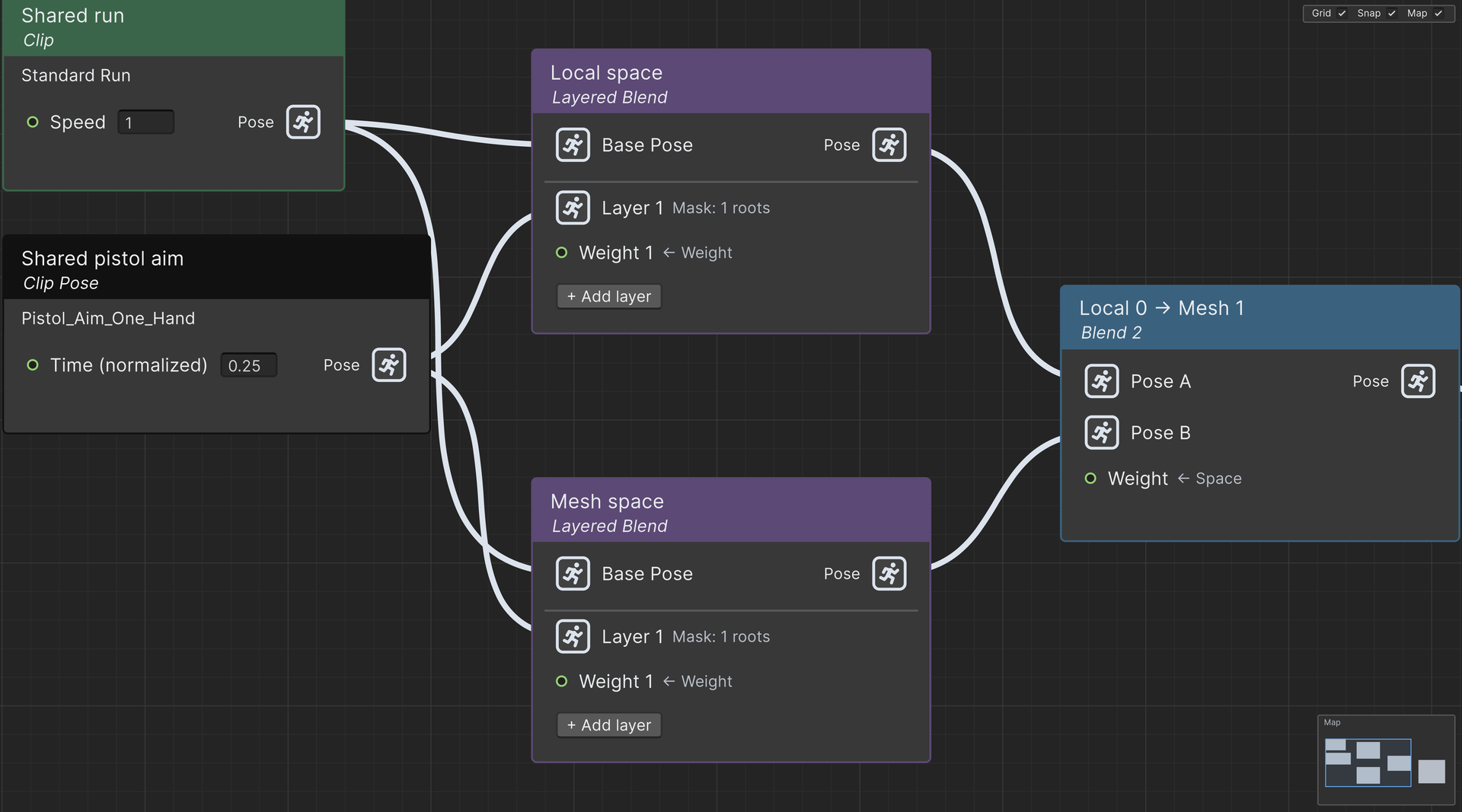
Mesh Space blends rotations in the model component frame. With Mesh Space off, rotations blend in their parent frames.
Inputs and output
| Port | Type | Function |
|---|---|---|
| Base Pose | Pose | The pose below all layers. |
| Layers | Pose and Float list | A pose, weight and mask per layer. |
| Pose | Output | The base with the layers applied. |
Settings
| Setting | Default | Function |
|---|---|---|
| Layers | Empty | Add each layer in the required order. |
| Layer Weight | 1 | Contribution of this layer before its mask. |
| Layer Mask | Empty | Select the bones that the layer can change. Empty includes all bones. |
| Timing | Off | In Animator behavior, move state length toward the length of this layer motion. |
| Mesh Space | Off | Blend rotations in component space when enabled. |
| Event Mode | Always | Select input events. |
| Curve Mode | Interpolated | Combine curves in layer order. |
| LOD Threshold | Disabled | Above the level, return Base Pose and stop demand for the layers. |
| Imported Animator layers | Off | Read-only conversion data under Advanced. Converted override layers retain their masked root motion. |
Common node controls
Name changes the canvas label. Type identifies the node and is read-only. Advanced shows structural pose connections and retained data.
Events and curves
| Setting | Function |
|---|---|
| Event Mode: Highest Weighted | Use events from the highest-weighted contributing input. |
| Event Mode: Always | Allow events from all contributing inputs. |
| Curve Mode: Interpolated | Blend curve values with the input blend weights. |
| Curve Mode: Additive | Add the contributing curve values according to the operation. |
| Curve Mode: Maximum | Use the largest contributing curve value. |
Bone mask
| Setting | Function |
|---|---|
| Empty mask | Include all bones. |
| Roots | Include each selected bone and its descendants. |
| Excluded Roots | Exclude each selected bone and its descendants after inclusion. |
| Transform paths | Use exact active or inactive transform entries. An empty path identifies the model root. |
| Humanoid body parts | Use Humanoid role flags, including the root motion flag. The target needs prepared Humanoid role data. |
Level of detail
| Setting | Function |
|---|---|
| Disabled | Apply no node threshold. |
| Enabled | Run the node when the character LOD level is at or below the selected level. Level 0 is a valid enabled threshold. |
| Above the threshold | Use the pass-through behavior stated for this node. LOD changes do not replace the node input requirements. |
Setup example
- Connect locomotion to Base Pose.
- Add an upper-body pose as the first layer and mask it from the spine.
- Add later layers only where they must have priority over earlier layers.
Try it in Gallery
Open 09 Layered Blend in the Gallery Graphs folder. Compare the local-space and mesh-space branches that layer pistol aim over a run.
Requirements and limits
- Each layer needs a pose compatible with the base.
- Mesh Space requires ordinary poses.
Reference details
BAS 1.0 reference. Node type: LayeredBlendNode. Main source: AnimNodes.cs. Defaults also use the node constructor and the shared Editor field definitions.