
 Documentation
Node reference / State and selection
State Machine
Select state pose graphs and blend between them when transition rules pass.
Concept
A state machine selects state poses and changes between them through transitions.
In BAS
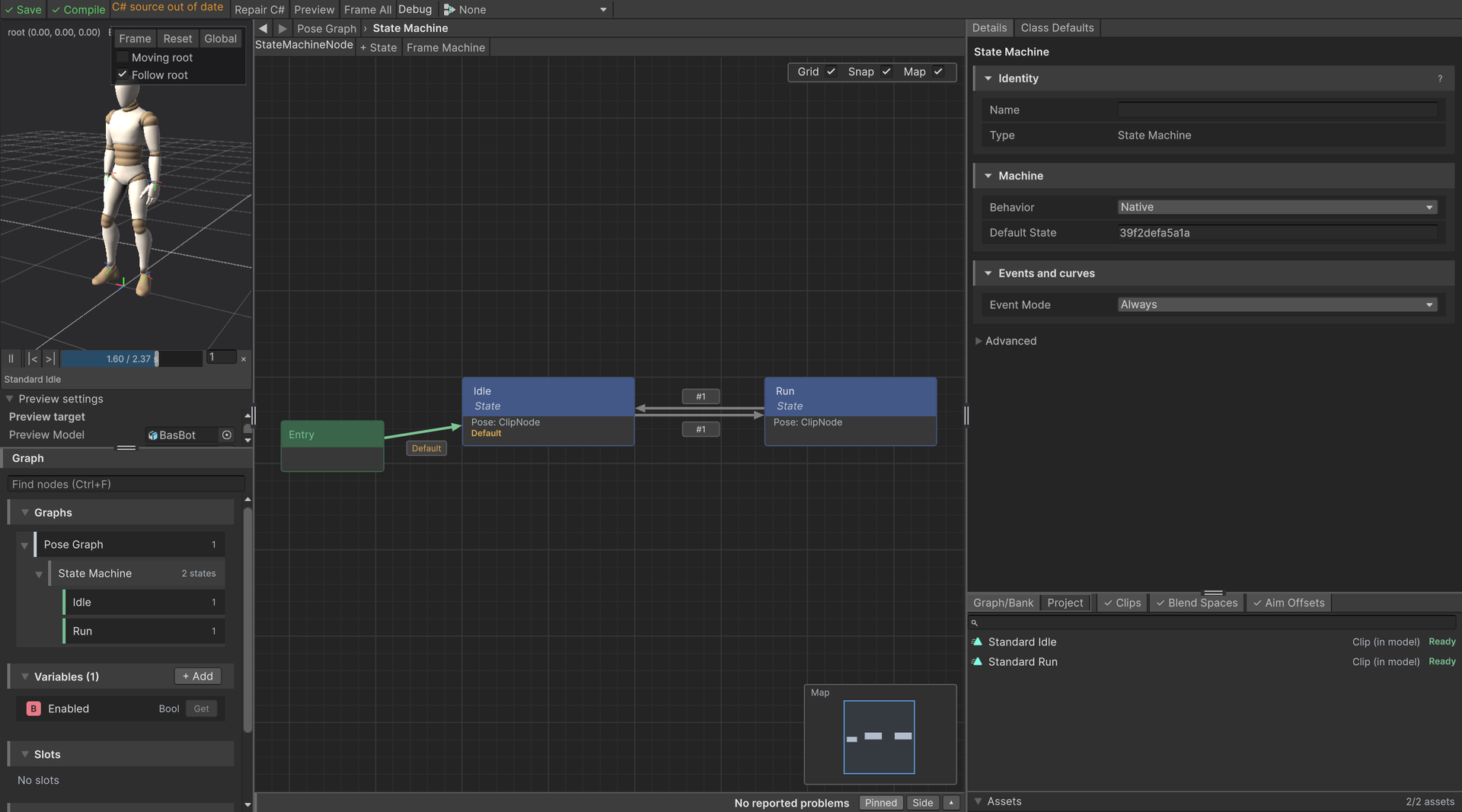
Each state supplies a pose graph. The default state is entered at startup and after reset.
BAS supports Native transition rules and supported Animator Controller behavior. Their allowed motions, transition methods and settings differ. The State Machine node page lists those requirements.
Example
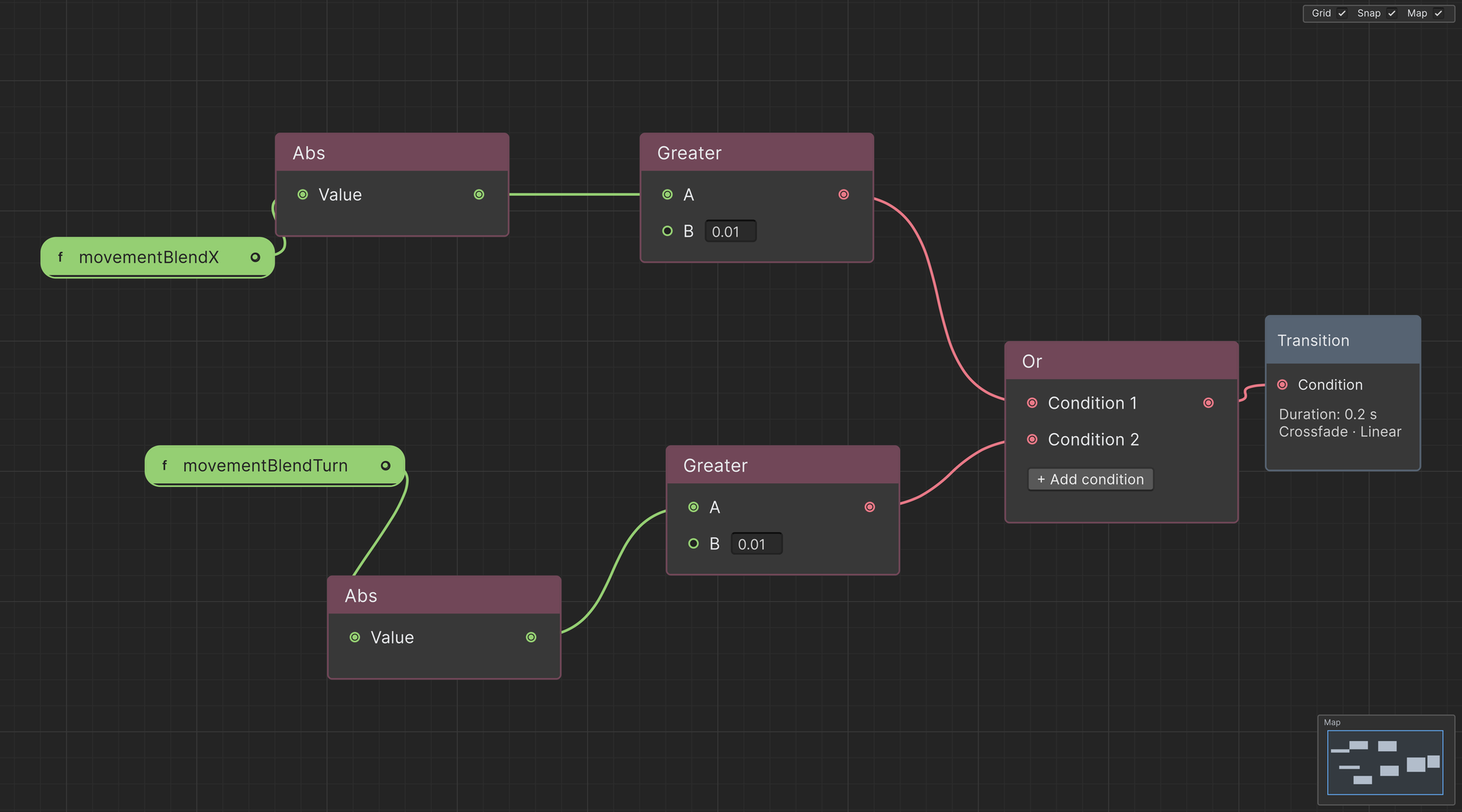
Use Idle and Move states with transition conditions that select the required motion.
Node
How it works
Initial State selects the state used at startup and reset. A state with no connected pose shows a warning and uses the reference pose.
Native behavior uses the BAS transition rules, with timed crossfades or spring responses. Animator behavior uses the supported Unity Animator transition rules and motion clock lanes.
Double-click the State Machine node to open its state canvas. Double-click a state to edit its pose. Select a transition line or label to edit the rule. Drag a label to move it.
For a Native transition with an empty rule graph, select Use Graph Rule to start editing it. Add Time to Blend Out and connect it to the result to fade out near the end of the source animation.
Inputs and output
| Port | Type | Function |
|---|---|---|
| State pose graphs | Internal poses | One pose graph for each state. |
| Pose | Output | The active state pose or blended transition contributions. |
Settings
| Setting | Default | Function |
|---|---|---|
| Behavior | Native | Select Native or the supported Animator behavior. |
| Initial State | Unassigned | Choose the startup and reset state. |
| Event Mode | Always | Select contributing state events. |
| States | Empty | Add named states and connect the pose in each state. |
| Transitions | Empty | Add directed edges in the order required by the transition rules. |
Common node controls
Name changes the canvas label. Type identifies the node and is read-only. Advanced shows structural pose connections and retained data.
State settings
| Setting | Function |
|---|---|
| Name and pose | Give each state a unique nonempty name. A connected pose supplies its animation. An empty state uses the reference pose. |
| Speed / Speed Parameter | Animator behavior: set the nonnegative state playback speed and an optional Float multiplier. |
| Time Parameter | Animator behavior: sample the state at the supplied normalized time without changing its state clock or exit-time tests. |
| Cycle Offset | Animator behavior: add a normalized sampling offset. It must be finite and is used without a Time Parameter. |
| Foot IK / Write Defaults | Retain converted Animator state settings. Conversion chooses the Foot IK clip form. Supported Animator behavior requires Write Defaults on. |
| Entry / Fully In State / Exit IDs | Set semantic feedback IDs for each state stage. Use no more than 32 unique valid IDs per list. |
Transition settings
| Setting | Function |
|---|---|
| Source / Destination | Choose the states joined by the edge. A destination must exist. |
| Conditions | All saved conditions must pass. An empty list passes. A state-time condition can test the state clock. |
| Value Rule | Native behavior: use one Bool expression instead of the saved condition list. The list must then be empty. |
| State Time | Native rule: elapsed seconds since the source state started. |
| State Time Remaining | Native rule: seconds left in the most relevant source animation, including its playback speed. |
| Normalized State Time | Native rule: animation progress, where 1 marks one complete cycle. The result can exceed 1. |
| Time to Blend Out | Native rule: true when the remaining time is at or below the crossfade duration. Use it with a timed Crossfade. |
| Method | Native behavior: Crossfade or Spring. Animator behavior accepts Crossfade only. |
| Duration | A finite nonnegative crossfade duration. Native uses seconds. Animator can use seconds or normalized source time. |
| Blend Curve / Custom Curve | Shape the crossfade target weight. Custom starts at 0, ends at 1 and stays in 0 to 1. Animator requires Linear. |
| Spring Half Life | Native behavior: the finite nonnegative response time for Spring. |
| Forceable | Native behavior: allow restart of a target that is still contributing. |
| Any State / Can Transition To Self | Animator behavior: permit an edge from any state or a restart of the same state. |
| Has Exit Time / Exit Time | Animator behavior: require the source motion to cross the normalized exit point. |
| Fixed Duration / Offset | Animator behavior: select seconds for Duration and a normalized target starting offset. |
| Interruption Source | Animator behavior: choose None, Source, Destination, Source Then Destination or Destination Then Source. |
| Ordered Interruption / Source Priority | Animator behavior: restrict interruption to earlier source edges and preserve their source-list priority. |
Events
| Setting | Function |
|---|---|
| Highest Weighted | Use events from the highest-weighted contributing input. |
| Always | Allow events from all contributing inputs. |
Setup example
- Double-click the State Machine and add Idle and Move. Open each state and connect a pose.
- Set Idle as Initial State. Use Make Transition to connect each pair of states.
- Set the transition conditions and blend duration. Connect the State Machine output to the next pose node.
Try it in Gallery
Open 19 State Machine in the Gallery Graphs folder. Inspect the Idle and Run states and the transition rules that read Enabled.
Requirements and limits
- Animator state motions must be a Clip, synchronized tree or supported Layered Blend. Write Defaults must be on.
- Animator transitions accept Crossfade with a Linear blend curve.
Editor guides
Reference details
BAS 1.0 reference. Node type: StateMachineNode. Main source: AnimNodes.cs. Defaults also use the node constructor and the shared Editor field definitions.